TL;DR #
This is a framework to audit e-commerce websites. It covers SEO, performance, accessibility, front-end code, architecture, security, integrations, documentation, and operations. Each section has sample do’s and don’ts, recommended tools, and evaluation criteria. The examples only show the idea. Real audits add many more program-specific, client-specific and project-specific checks. Deliverables are an executive summary, a detailed findings report, and a scorecard (1 to 5 rating) to prioritize fixes.
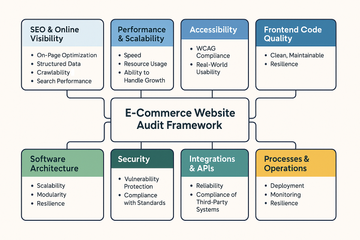
1. SEO & Online Visibility #
What to check: On-page optimization, structured data, crawlability, and search performance.
✅ Do
- Use descriptive page titles & unique meta descriptions.
- Add structured data (schema.org for products, reviews, breadcrumbs).
- Submit XML sitemaps to Google Search Console.
❌ Don’t
- Stuff keywords unnaturally.
- Use duplicate content across product pages.
- Block important content with robots.txt.
SEO Tools #
- Browser: Lighthouse SEO Audit: Documentation
- SaaS: SEMrush: Docs, Ahrefs: Academy, Screaming Frog: User Guide
- Agentic: Surfer SEO: Knowledge Base for content optimization
2. Performance & Scalability #
What to check: Speed, resource usage, and ability to handle growth.
✅ Do
- Optimize images (WebP/AVIF, responsive sizes).
- Minify and bundle JS/CSS carefully.
- Use a CDN for global delivery.
❌ Don’t
- Load blocking scripts in
<head>. - Ignore mobile performance (LCP > 2.5s is bad).
- Rely only on vertical scaling instead of elasticity.
Performance Tools #
- Browser: Chrome DevTools: Performance tab guide
- SaaS: WebPageTest: Documentation, GTmetrix: Help Center, SpeedCurve: Docs
- CI/CD: Lighthouse CI: Getting Started, k6: Documentation for load testing
3. Accessibility #
What to check: Compliance with WCAG 2.2 and real-world usability.
✅ Do
- Provide alt text for all images.
- Ensure sufficient color contrast (use a contrast checker).
- Make all functionality accessible via keyboard.
❌ Don’t
- Convey information only by color.
- Hide focus outlines.
- Skip ARIA roles where needed.
Accessibility Tools #
- Browser: axe DevTools: User Guide, WAVE: Documentation, Lighthouse Accessibility Audit: Accessibility docs
- Automated: Pa11y CI: Usage Guide
- Manual: Screen readers (NVDA: User Guide, JAWS: Documentation, VoiceOver: User Guide)
Reference: Publicis Sapient CoE Accessibility in Canada: “Accessibility for All” initiative
4. Front-End Code Quality #
What to check: Clean, maintainable, and performant code.
✅ Do
- Write semantic HTML (
<button>, not<div onclick>). - Use CSS naming conventions (e.g. BEM).
- Split JS bundles and lazy load non-critical code.
❌ Don’t
- Mix styling inline (
style=""). - Abuse
!importantin CSS. - Depend on large frameworks for trivial functionality.
Quality Tools #
- Static Analysis: ESLint: Documentation, Stylelint: User Guide
- Browser: Coverage tab in DevTools (unused CSS/JS)
- CI/CD: SonarQube: Documentation for code quality
5. Software Architecture #
What to check: Scalability, modularity, and resilience.
✅ Do
- Apply Domain-Driven Design for modularity.
- Version APIs and document them (Swagger, OpenAPI).
- Add observability (structured logging, distributed tracing).
❌ Don’t
- Couple business logic tightly with UI.
- Skip caching strategies (API + DB).
- Forget failure recovery (retry, circuit breaker).
Architecture Tools #
- Code Level: Architecture Decision Records (ADR): Templates, PlantUML: Language Reference Guide diagrams
- Monitoring: Datadog: Documentation, New Relic: Docs, OpenTelemetry: Documentation
- Testing: Postman: Learning Center/Newman: CLI docs for APIs
6. Security #
What to check: Protect against vulnerabilities, compliance with standards.
✅ Do
- Use HTTPS everywhere (HSTS enabled).
- Hash and salt passwords (bcrypt, Argon2).
- Apply least privilege to user roles.
❌ Don’t
- Store secrets in code.
- Trust client-side validation alone.
- Disable security headers (CSP, X-Frame-Options).
Security Tools #
- Browser: Security tab in Chrome DevTools
- Code Level: OWASP Dependency-Check: Documentation, Snyk: Documentation
- SaaS: Burp Suite: Documentation, OWASP ZAP: User Guide (DAST scans)
7. Integrations & APIs #
What to check: Reliability and compliance of third-party systems.
✅ Do
- Implement retry & backoff strategies.
- Secure APIs with OAuth2/JWT.
- Use monitoring for payment/logistics APIs.
❌ Don’t
- Hardcode API keys.
- Skip sandbox testing before production release.
- Assume vendor APIs never change.
Integrations Tools #
- Postman: Documentation, Insomnia: Documentation (manual testing)
- Pact: Documentation (contract testing)
- WireMock: Documentation (API mocking)
8. Documentation & Governance #
What to check: Knowledge sharing, standards, and process.
✅ Do
- Maintain a living API spec.
- Document architecture decisions.
- Include audit reports with scoring and remediation.
❌ Don’t
- Let docs go stale.
- Hide findings in long PDFs with no clear action plan.
- Forget to track NFRs in backlog.
Documentation Tools #
- Confluence: Documentation, Notion: Help Center, or GitHub Wiki: About wikis
- ADR templates: Examples (Architectural Decision Records)
- Scorecards & dashboards (Grafana: Documentation)
9. Processes & Operations #
What to check: Deployment, monitoring, and resilience.
✅ Do
- Automate testing in CI/CD (unit, integration, regression).
- Add DevSecOps scanning to the pipeline.
- Define SLAs and measure them with monitoring.
❌ Don’t
- Deploy directly to production without review.
- Ignore alert fatigue (too many false alarms).
- Skip cost monitoring for cloud services.
Process Tools #
- CI/CD: GitHub Actions: Documentation, GitLab CI: CI/CD Guide, Jenkins: Documentation
- Observability: Prometheus: Documentation + Grafana: Docs, ELK Stack: Documentation
- Incident Mgmt: PagerDuty: Documentation, Opsgenie: Documentation (end of sale announced by Atlassian)
Deliverables of the Audit #
- Executive Summary for stakeholders
- Detailed findings with “Do/Don’t” recommendations
- Scorecards for SEO, performance, accessibility, security, etc.
- Actionable roadmap with priorities (Quick Wins vs. Long-Term Fixes)
Example Deliverables #
Executive Summary (Example) #
Project: Audit of “ShopNow E-Commerce” Date: September 2025
The audit identified several strengths in the current platform, including a scalable cloud architecture and good API documentation. But there are significant gaps in accessibility, performance, and security.
- Accessibility: The site does not meet WCAG 2.2 AA. Missing alt text, poor contrast, and keyboard traps were found. This limits usability for a portion of users and poses compliance risks.
- Performance: Load times on mobile devices are slow (LCP ~4.2s). Large unoptimized images and render-blocking scripts are the main issues.
- Security: Outdated libraries with known vulnerabilities were detected. No CSP headers are set, leaving the site vulnerable to XSS attacks.
- SEO: Overall strong, but duplicate meta descriptions and missing structured data for products reduce search visibility.
Recommended Roadmap:
- Quick Wins (0 to 3 months): Fix image optimization, apply security headers, add alt text.
- Mid-Term (3 to 6 months): Upgrade dependency management, add Lighthouse CI in pipeline, implement automated accessibility checks.
- Long-Term (6+ months): Redesign color palette for accessibility, adopt service mesh for API resilience, build observability dashboards.
Scorecard (Example, 1 to 5 Rating) #
| Category | Rating (1 to 5) | Notes |
|---|---|---|
| SEO | 3 | Indexing is fine, but missing structured data and duplicate metas. |
| Performance | 2 | Mobile performance weak (LCP > 4s), no CDN usage. |
| Accessibility | 1 | WCAG compliance poor, several critical blockers. |
| Frontend Code | 3 | Semantics okay, but CSS unstructured, JS bundles too large. |
| Architecture | 4 | Modular and scalable, but observability limited. |
| Security | 2 | Outdated libs, missing CSP and secure headers. |
| Integrations | 4 | APIs well documented, retry logic missing in payments. |
| Documentation | 3 | Good developer docs, but no audit or ADRs kept updated. |
| Processes/Ops | 4 | CI/CD pipeline in place, but no DevSecOps or automated scans. |
Legend:
- 1 = Critical (high risk, urgent fix needed)
- 2 = Weak (many gaps, below industry standard)
- 3 = Acceptable (meets minimum expectations, needs improvements)
- 4 = Strong (good practice, minor improvements possible)
- 5 = Excellent (industry leading, no action needed)
Comments
Comments are hosted by EchoThread. Loading them connects your browser to their servers in the US. Details in the privacy notice.