The general illusion #
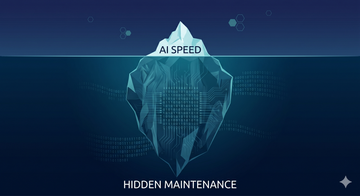
I see it every day now. A developer types a short prompt. The AI agent writes 200 lines of code. It looks perfect. The UI is pretty. The feature is "done" in ten minutes. We call this vibe coding. If it feels right and the demo works, we ship it.
But there is a trap. AI is good at making things that look like they work. It is not always good at making things that actually work for a long time. In almost 30 years of tech, I have seen many hypes. AI is different because it is so fast. It can create technical debt faster than any human.
We need to talk about the real price of this speed. It is not just about writing code. It is about owning it.
What changed with AI coding agents #
Before, we had "Copilots". They suggested a line or a block. Now we have "Agents". They can create whole projects. They can run terminal commands. They can "fix" bugs themselves. The barrier to entry is gone. Even people who never learned how a browser works can now build a web app. This is great for ideas. But it is dangerous for systems that need to stay alive for years.
The myth of "Agent Only" code #
I hear a new idea lately. People say: "Why do we care about clean code? Why format it nicely?" They think the agent can read any mess. They say we can just recreate the code every time with a prompt. If it is ugly for humans, it does not matter because humans do not read it anymore.
Some say that in the future we will not need clean code anymore, because AI will manage and understand any mess. We are not there yet.
Right now, AI still does a lot of things wrong. When an agent makes a mistake, it is still the human who has to jump in and find the bug. Because of this, being able to read and understand code is still important. If the code has no structure, it has no logic you can follow to correct the AI's errors. "Vibe coding" should not mean "messy coding" today. Good engineering is still about clarity.
The illusion of speed #
Speed is the main selling point. But we often confuse "shipping code" with "delivering value". If the code causes a security leak next week, the speed was a lie. True speed is measured by how long the code stays in production without breaking.
Skill gap and trust in AI output #
There is a big problem called Automation Bias. When the AI gives a confident answer, we tend to believe it.
- Novices: A study showed that beginners who use AI often score 17% lower on understanding the concepts they just "coded".
- Experts: Senior engineers use AI to skip the boring parts. But even they can get lazy. If you do not understand the output, you cannot validate it.
- The Trust Gap: 80% of teams trust AI tools, but 59% are worried about the bugs they bring.
Technical debt and maintainability #
AI code often lacks "soul" or what we call clean architecture.
- Code Churn: GitClear found that code duplication is rising fast. AI often copy-pastes logic instead of creating reusable modules.
- Maintenance Cost: "It works" is only the start. 46% of code changes are now new lines, but refactoring is going down. This means we are building a big pile of code that nobody wants to touch later.
Security risks you still see every day #
AI-generated code has 2.74 times more vulnerabilities than human code.
- Secrets Exposure: There is a 40% jump in hardcoded API keys and tokens.
- Privilege Escalation: These paths increased by 322%. The AI often uses permissive defaults from its training data.
Example: Exposed API Key #
BAD (AI often does this for speed): #
const apiKey = "sk-1234567890abcdef";
fetch(`https://api.service.com/data?key=${apiKey}`);
BETTER: #
// Use environment variables and a backend proxy
const response = await fetch('/api/proxy-endpoint');
Performance and data architecture mistakes #
AI likes to solve things "locally". If you ask for a list of active users it might fetch 10,000 users and filter them in the browser.
Example: Client-side filtering #
BAD: #
const users = await fetch('/api/all-users').then(res => res.json());
// AI filter on client side. Very slow with 10,000 users!
const activeUsers = users.filter(u => u.active === true);
BETTER: #
// Filter on the database level
const activeUsers = await fetch('/api/users?status=active').then(res => res.json());
Accessibility and why we still fail #
AI still fails at accessibility at scale. It can help with simple alt text, but it struggles with complex keyboard navigation.
Example: The "Fake" Button #
BAD: #
<div onclick="submitForm()" class="blue-box">Click Me</div>BETTER: #
<button type="button" onclick="submitForm()">Click Me</button>Why? A real button handles the Space and Enter keys by default. A div does nothing.
Why "just fix it later" does not work #
Many think: "I build fast now and then I let an agent refactor it later." This is a lie.
- Security: A leaked key is leaked forever.
- Architecture: You cannot "patch" a bad data model easily when the app is live.
- Accessibility: If your core components are broken, fixing them later means rebuilding the whole UI.
This problem is not new #
We had bad code before AI. But AI increases speed and volume. It lowers the barrier to ship bad solutions. We are now producing mess at scale.
Training data problem "shit in shit out" #
AI learns from the internet. The internet is full of bad, old and insecure code.
- Amplification Bias: A 2024 study found that AI does not just learn human mistakes. It makes them worse.
- Outdated Patterns: AI might suggest older ways to code because they were popular years ago.
Where AI actually works well #
I am not anti-AI. It is great for:
- Writing unit tests for small functions.
- Explaining complex legacy code.
- Generating boilerplate like CSS Grid layouts.
- Helping with regex.
Practical mitigation playbook #
If you use AI agents in your team you need rules. Here is my "Stay Safe" list:
- Strict Performance Budgets: No page should load more than 200kb of JS. This stops AI from importing huge libraries.
- No "Vibe Reviews": Pull Requests must be reviewed by a human who understands the logic. Do not just look at the screenshot.
- Automated Security Scans: Use tools like Snyk to catch AI mistakes before they merge.
- Accessibility First: Run axe-core in your pipeline. If the AI built a div button, the build must fail.
- Clean Code Standards: Even if an agent wrote it, it must be formatted and readable. No "Agent Only" code allowed.
- Small Contexts: Give the agent small tasks. Do not say "Build me a shop". Say "Build me a component for a price tag".
AI is a power tool. It is like a chainsaw. It can help you build a house fast. But if you don't know how to use it, you might lose a leg. Let's stay safe.
Comments
Comments are hosted by EchoThread. Loading them connects your browser to their servers in the US. Details in the privacy notice.